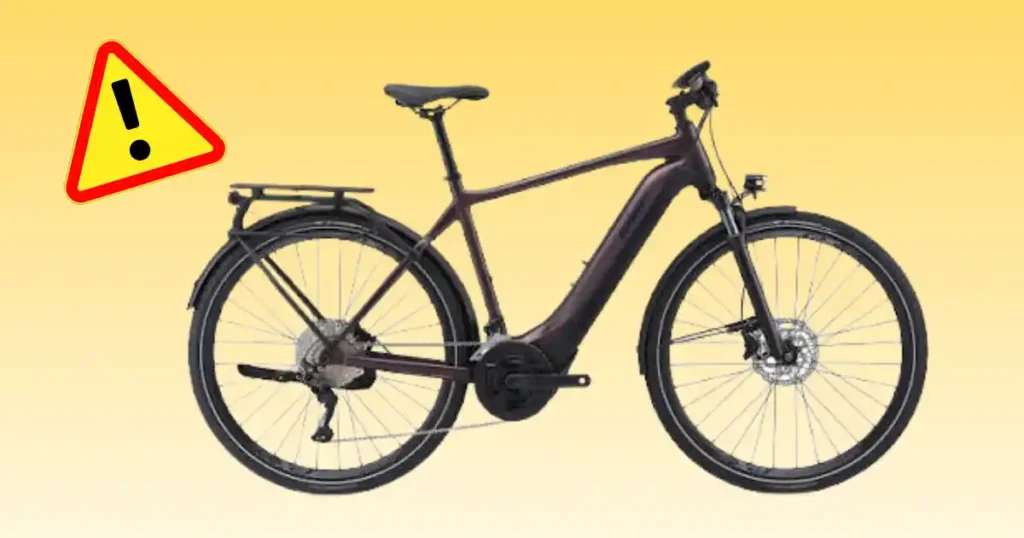
Standing beside my bike on a damp morning in Portland, pressing the power switch only to see a dark screen is a quick way to ruin a commute. Encountering a Giant Explore E+ 1 not starting scenario often feels like a complete system shutdown, but the root cause is frequently a simple connection issue. Over years of riding and servicing electric trekking bikes, I have seen how small electrical glitches can pause your ride. This guide walks you through easy steps to find the problem and get moving again.
What Does “Giant Explore E+ 1 Not Starting” Mean?
When an e-bike fails to operate, the exact symptoms point directly to the underlying system issue. Identifying whether the fault stems from the display, the battery, or the drive unit saves time during checks.
The bike will not power on at all
A complete blackout means pressing the main control button yields no light or screen response. The RideControl buttons remain unresponsive, leaving you without battery status indicators or system activity.
The display turns on but the motor does not assist
In this situation, the screen lights up and functions normally, but your pedaling receives no motor boost. The drive unit fails to engage even when you select higher support levels.
The bike starts and then shuts down
The system powers up briefly before instantly cutting off. This sudden loss of power often stems from loose battery contacts, deep voltage drops, or internal thermal protection limits.
The battery will not charge
Plugging in the charger produces no status light change or progress on the pack indicator. The battery stays flat, which prevents the bike from starting up on your next ride.
The controls work but the bike will not assist
Your display responds to input and changes modes, yet the cranks feel heavy under foot. This indicates that while the rider interface works, the motor drive circuit remains inactive.
First 60-Second Check Before Troubleshooting
Before taking components apart, run through basic visual checks on your driveway. Simple oversight accounts for a large percentage of sudden power failures.
Check the battery
Confirm that the EnergyPak battery is clicked securely into the frame slot. Verify that the pack holds sufficient charge by pressing its built-in LED level test button.
Check the main controls
Inspect the top-tube mounted RideControl Go 2 unit and the handlebar Ergo4 remotes. Ensure the buttons press cleanly without sticking or holding moisture in the housing gaps.
Check the display
Look closely at the RideDash EVO 2.0 color screen. Check if it remains dark, flashes an error icon, or displays a specific fault code upon pressing power.
Check the charger
Verify that the wall outlet delivers active power and all cable connections fit snugly. Look at the smart charger status light to confirm it signals normal operation.
Check the bike for obvious damage
Inspect wire runs for pinch marks after a recent drop or storage move. Ensure external sensors, magnetic wheel pickups, and frame ports show no physical cracks or water intrusion.
Giant Explore E+ 1 Not Starting: Common Causes
Modern electric bikes rely on integrated networks connecting the battery, controls, sensors, and motor. Tracking power pathways systematically helps isolate electrical faults.
Low or depleted battery
A deeply discharged EnergyPak pack cannot supply the initial voltage needed to boot up the system controller. Storing the bike in cold garages accelerates natural voltage drain.
Battery connection problem
Vibration from rough roads can shift terminal seating inside the down tube. Dirt or oxidized film on gold-plated contacts interrupts key power signals to the controller.
Power-control problem
Moisture inside the handlebar remote or top-tube control module stops button signals. A frozen control circuit prevents the system from receiving the initial wake-up command.
Display problem
A loose cable connection behind the RideDash screen blocks the boot sequence. While the main system may hold power, a dark screen prevents normal ride control.
Charger problem
A faulty charging unit fails to refresh the battery pack between rides. Without a full charge cycle, the internal battery management system keeps the bike locked off.
Motor-assist problem
Faulty pedal-assist sensors stop torque signals from reaching the SyncDrive unit. The system powers up correctly, but the motor remains idle while you pedal.
Giant Explore E+ 1 Troubleshooting at a Glance
This quick diagnostic table matches common startup issues with quick check areas. Use these practical steps to evaluate your e-bike before visiting a repair shop.
| What happens | Possible area | First check |
| Nothing powers on | Battery/control | Battery and power control |
| Display stays blank | Power/display | Battery and RideControl |
| Display works, no assist | Motor/system | Support mode and warnings |
| Battery will not charge | Charger/battery | Outlet and charger |
| Bike starts then stops | Battery/system | Charge and system status |
| Controls work oddly | Control system | Visible damage and status |
| Motor makes unusual noise | Drive system | Stop and inspect |
| Error appears | E-bike system | Record the exact message |
Check the Giant EnergyPak Battery
The EnergyPak 800Wh battery supplies high-voltage power to the entire drive architecture. Ensuring proper battery health is the foundation of resolving startup issues.
Confirm the battery has charge
Press the charge indicator button on the battery casing to read current capacity. Connect the smart charger and wait for the status light to confirm active charging.
Check the battery installation
Align the EnergyPak guide rails carefully before latching it into the down tube frame space. Listen for a firm mechanical click to ensure full electrical contact.
Consider storage conditions
Extreme cold reduces lithium-ion battery performance and voltage output. Bring cold batteries indoors to warm up to room temperature before attempting to power on.
Do not open the battery
Never remove structural screws or puncture the protective EnergyPak outer casing. Opening sealed battery packs voids safety certifications and poses severe fire hazards.
Check the Giant Charger and Charging Process
A functioning power supply is required to keep your e-bike operational. Testing your charging gear prevents mistaking a flat battery for a dead motor.
Check the wall outlet
Plug a standard lamp or tool into your wall socket to verify power delivery. Avoid using weak extension cords that cause voltage drops during charging.
Check the charger
Inspect the EnergyPak smart charger housing for heat damage or frayed cords. Ensure the cooling vents remain clear of dust and obstruction during use.
Check the charging connection
Align the multi-pin charging plug directly with the frame port or battery terminal. Keep contacts clean, dry, and free of metallic debris that causes short circuits.
What if the charger shows no normal activity?
If the charger LED flashes red or stays completely off, disconnect it from the wall. Discontinue using damaged charging hardware and seek an official replacement.
Check RideControl Go 2 and RideControl Ergo4
Integrated controls manage power distribution and assist levels across your ride. Inspecting these entry points helps resolve stubborn startup glitches.
Check the power control
Press the central power button on the top-tube RideControl Go 2 unit firmly once. Observe if the ring lights illuminate to indicate system initialization.
Check the handlebar remote
Ensure the buttons on the RideControl Ergo4 dual remotes depress smoothly. Clean away dirt buildup around button edges that might hold switches down.
Check for physical damage
Examine control housings for impact cracks following a fall or transport accident. Water penetrating damaged control buttons leads to intermittent power loss.
Do not start unplugging system components
Avoid pulling on delicate wiring harnesses or forcing sealed system plugs apart. Randomly disconnecting live e-bike wiring can damage sensitive control boards.
Check the RideDash EVO 2.0 Display
The RideDash EVO 2.0 screen provides full-color system feedback and navigation. Checking display connections helps confirm overall electronic health.
If the display is completely blank
Verify that the battery is fully charged and securely seated in the frame. Check the main cable leading from the handlebars down into the frame portal for pinches.
If the display turns on normally
Confirm that the screen shows an active battery percentage and assist mode. Ensure the system is not locked in a zero-support setting before riding.
If an error or warning appears
Note any specific error codes or caution icons displayed on the color screen. Write down exact numbers to assist your technician during service visits.
Why recording the error matters
Specific error codes pinpoint sensor, battery, or motor communication faults instantly. Providing exact codes allows mechanics to prepare the right repair parts.
What If the Giant Explore E+ 1 Turns On but Has No Motor Assistance?
A bike that lights up but fails to assist points to sensor or drive engagement issues. Isolate control settings from mechanical drive faults systematic check.
Check the support mode
Use the Ergo4 remote to step up from Off to Eco, Basic, or Smart assist modes. Verify on the screen that support levels actively change with button presses.
Start pedaling normally
Apply steady pedal force on a flat, open paved surface to trigger support sensors. The SyncDrive motor requires active crank rotation and chain tension to engage.
Check for warning information
Scan the display for flashing service icons or power limitation notices. High system temperatures or low battery voltage automatically restrict motor output.
Consider the pedal-assist sensor system
The PedalPlus 6-sensor system reads cadence, speed, torque, and motor rotation continuously. Clean dirt away from rear wheel speed sensors and spoke magnets.
Check whether the bike is in a normal operating state
Ensure the battery latch is closed and no brake cutout switches are stuck. Verify that the system completes its boot sequence before you begin pedaling.
Check the SyncDrive Pro 2 Motor
The SyncDrive Pro 2 motor delivers 85Nm of torque for smooth hill climbing performance. Recognizing internal drive issues helps you seek timely technical aid.
Signs the motor may need professional inspection
Loud grinding sounds, severe casing heat, or sudden power dropouts indicate internal motor issues. Stop riding immediately if the drive unit vibrates violently.
Do not open the motor housing
Never attempt to open factory-sealed motor cases or remove crank axles at home. Internal gears require factory alignment and specialized service tools.
Separate motor failure from system failure
A non-responsive drive unit often stems from sensor disconnects rather than total motor failure. Rule out battery, cable, and control issues first.
Giant Explore E+ 1 Not Starting After Storage
Bringing an e-bike out of long seasonal storage requires systematic checks. Low battery levels and stiff connections are common after months of sitting idle.
Check battery charge
Lithium-ion cells discharge slowly when left sitting over extended winter months. Connect your smart charger to bring the battery back to full operating capacity.
Inspect the bike
Look over the entire frame for cobwebs, rodent damage on exposed wires, or dust accumulation. Clean frame ports before powering up the system.
Check the tires and brakes
Inflate tires to recommended sidewall pressures to reduce pedaling drag. Squeeze brake levers repeatedly to ensure hydraulic calipers release fully.
Look for corrosion or moisture
Inspect battery terminals for white oxidation or surface rust on copper pins. Clean dry contacts gently with a soft cloth before installing the pack.
Giant Explore E+ 1 Not Starting After Rain or Washing
Riding through heavy storms or washing your bike can trap moisture around electronic housings. Proper drying techniques protect delicate internal circuits.
Dry the bike first
Wipe down the entire frame, control units, and display with a soft microfiber towel. Allow the bike to air out in a warm, dry room before turning power on.
Do not charge a wet connection
Always verify that the charging port cover and plug pins are completely dry before plugging in. Water inside charging ports creates short circuits.
Check for new symptoms
Watch for flickering display screens or erratic mode changes after wet rides. These signs indicate temporary moisture intrusion inside control housings.
When water exposure needs professional attention
If the system refuses to power on after several days of drying, seek dealer service. Persistent water faults require internal component drying and seal replacement.
Giant Explore E+ 1 Troubleshooting by Symptom
Use this structured symptom guide to determine your next maintenance step. Pathing your specific issue saves effort and isolates faults quickly.
| Symptom | What to check first | Next step |
| No lights or display | Battery/power | Check charge and controls |
| Display works | System status | Check warnings and support |
| Battery won’t charge | Charger/outlet | Check charging setup |
| Motor won’t assist | Support/sensors | Check system status |
| Turns off during use | Battery/system | Check charge and warnings |
| Control won’t respond | RideControl | Inspect for damage |
| Strange motor noise | Drive system | Stop and seek service |
| Repeated error | System fault | Record code/message |
Giant Explore E+ 1 Battery Problems vs. Motor Problems
Riders often worry that a non-responsive bike means a failed motor. Comparing symptom profiles helps distinguish simple power supply faults from drive issues.
| Sign | More likely area | What to do |
| No power anywhere | Battery/control | Check battery and controls |
| Display works but no assist | Motor/system/sensors | Check system status |
| Battery will not charge | Charger/battery | Check charging setup |
| Motor makes unusual noise | Motor/drive | Stop and inspect |
| System shuts down | Battery/system | Record conditions |
| Display shows error | E+ system | Record exact message |
Safe Checks You Can Do Yourself
Limit home maintenance to simple cleaning, visual inspections, and normal charging operations. High-voltage systems require cautious handling to ensure rider safety.
Safe basic checks
- Verify battery seating and latch security
- Test wall outlets and charging cable connections
- Inspect wire housing runs for visible exterior damage
- Clean speed sensor magnets and frame contacts
- Check tire pressures and hydraulic brake lever feel
- Record error codes displayed on the color screen
Do not attempt
- Opening sealed EnergyPak battery cases
- Disassembling the SyncDrive Pro 2 motor body
- Bypassing internal battery management systems
- Splicing or modifying main electrical wire harnesses
- Forcing bent connection pins back into alignment
Why this matters
Attempting internal repairs on high-energy lithium batteries creates severe fire hazards. Trusting trained technicians protects your safety and keeps factory warranties valid.
When to Stop Troubleshooting the Giant Explore E+ 1
Certain severe symptoms demand an immediate halt to home checks. Recognizing dangerous failure modes protects both you and your equipment.
Stop if the battery is visibly damaged
Discontinue use immediately if the EnergyPak case shows cracks, swelling, or impact dents. Never charge a battery that emits chemical smells or excessive heat.
Stop if electrical wiring is damaged
Cease testing if you spot melted wire insulation, exposed copper strands, or scorch marks. Damaged wiring can short-circuit delicate system control boards.
Stop if the motor behaves abnormally
Stop riding if the motor housing becomes uncomfortably hot or makes loud metallic grinding sounds. Forcing a binding motor destroys internal drive gears.
Stop if the bike has crash damage
Have your bike inspected after hard crashes or car rack impacts. Frame cracks or crushed control units compromise structural and electrical safety.
When to Visit a Giant Dealer or E-Bike Technician
Professional diagnostic software interfaces directly with the Giant E+ ecosystem. Certified technicians resolve complex internal faults efficiently.
Seek professional help for
- Persistent system error codes that clear intermittently
- Complete failure of the EnergyPak smart charger
- Internal motor noise or total loss of pedal assist
- Repeated power shutdowns during normal riding
- Water damage inside sealed control modules
What information to give the technician
Provide your technician with the exact model year and current battery charge level. Detail when the power loss occurred, including weather conditions or recent drops.
Use official Giant documentation
Refer to official Giant user manuals for model-specific operating parameters. Certified documentation offers accurate guidance for torque specs and system care.
USA E-Bike Expert Advice for a Giant Explore E+ 1
Taking a structured approach to e-bike care prevents small electrical issues from turning into costly repairs. Expert guidance keeps your ride dependable.
Expert advice angle
Focus on systematic diagnostics starting at the power source before assuming controller failure. Clean contacts and fully charged batteries solve most startup problems.
Name reference
Consult an authorized Giant dealer service department for advanced electrical diagnostics to maintain system integrity and factory coverage.
Quote strategy
Follow official manufacturer service protocols when inspecting high-capacity battery units. Standard technical guidelines ensure safe operation and long pack life.
EEAT details to add during writing
Documenting exact environmental conditions during power loss provides valuable diagnostic context. Sharing clear observations helps shop mechanics isolate faults faster.
Giant Explore E+ 1 Model-Year Differences
Giant updates system hardware, batteries, and control software across model generations. Verifying your exact setup ensures correct troubleshooting steps.
Current 2026 Explore E+ 1
- SyncDrive Pro 2 motor with 85Nm of torque
- PedalPlus 6-sensor intelligent support technology
- Top-tube RideControl Go 2 integrated console
- Handlebar-mounted RideControl Ergo4 dual remotes
- RideDash EVO 2.0 full-color center display
- EnergyPak 800Wh high-capacity down tube battery
- EnergyPak 4A smart charger unit
Why older Explore E+ models may differ
Earlier model years may feature lower capacity EnergyPak batteries or different motor tuning. Display consoles and handlebar remote layouts vary by generation.
Verify before following model-specific instructions
Check the product label on your frame down tube to confirm exact model details. Refer to the corresponding owner manual for correct voltage and care specs.
Giant Explore E+ 1 Quick Checklist
Run through this quick checklist whenever your e-bike refuses to start. Systematic checks get you back on the trail quickly.
Power-on checklist
- EnergyPak battery holds adequate charge level
- Battery latches securely into the frame slot
- Wall outlet powers the smart charger normally
- RideControl Go 2 button depresses cleanly
- RideDash EVO 2.0 display powers up brightly
- System screen shows no active error codes
- Pedal assist modes select normally on remotes
- External wiring and ports show no physical damage
If it still will not start
Stop pressing power buttons repeatedly to avoid locking the controller. Write down any visible error codes and contact your local Giant dealer for service.
DIY Check or Professional Service?
Use this decision guide to determine whether an issue can be checked at home or requires professional shop diagnostics.
| Problem | Basic check | Professional service |
| Battery needs charging | Yes | Usually no |
| Outlet/charger check | Yes | If charger is faulty |
| Display stays blank | Basic check | If persistent |
| Control not responding | Basic check | If persistent |
| Motor gives no assistance | Basic check | Recommended if unresolved |
| Battery appears damaged | No repair | Yes |
| Wiring is damaged | Inspect only | Yes |
| Motor fault | No internal repair | Yes |
| Repeated system error | Record message | Recommended |
Frequently Asked Questions About Giant Explore E+ 1 Not Starting
Why is my Giant Explore E+ 1 not starting?
A low battery, loose frame connection, faulty control switch, or dark screen can stop startup. Check battery charge and control buttons first.
Why won’t my Giant Explore E+ 1 turn on?
A fully depleted EnergyPak pack, poor terminal contact, or a damaged RideControl switch prevents the electronic system from initializing power.
Why does my Giant Explore E+ 1 turn on but not assist?
Ensure an active support mode is selected and pedal sensors are clean. System warnings or loose speed sensor magnets also pause motor assist.
Why is my Giant Explore E+ 1 battery not charging?
Verify that the wall socket has power and charging pins are clean and dry. Inspect the 4A smart charger housing for fault indicator lights.
How do I know if my Explore E+ battery is bad?
A single dead charge cycle does not mean a bad battery. Persistent failure to take charge, physical swelling, or error codes require shop evaluation.
Why does my Giant Explore E+ 1 keep shutting off?
Sudden shutdowns stem from loose battery latches, thermal protection limits, deep voltage drops, or internal controller fault alerts.
Can I repair the Explore E+ battery myself?
Do not open or repair EnergyPak battery packs at home. Internal lithium cells require factory tools and specialized safety equipment.
What motor does the Giant Explore E+ 1 use?
The current Explore E+ 1 features the Giant SyncDrive Pro 2 motor, delivering 85Nm of torque with PedalPlus 6-sensor technology.
Final Recommendation
Dealing with an e-bike that refuses to turn on can be frustrating, especially when you are geared up and ready to ride. In my experience servicing e-bikes through rainy Pacific Northwest seasons, most startup problems come down to simple fixes like reseating the battery or drying out control buttons. Taking a structured approach prevents unnecessary stress and keeps you from jumping to worst-case scenarios like motor failure.
Focus on basic checks like verifying your charger, cleaning frame contacts, and recording error codes before booking a shop visit. If you ever encounter damaged wiring or a swollen battery pack, always leave those repairs to certified technicians. Taking good care of your electronic components ensures your Giant Explore E+ 1 stays reliable on every adventure.

Ehatasamul Alom is a dedicated road hybrid bikes expert. With over 15 years of experience, he helps people find the perfect ride. He began his journey as a bike mechanic. He learned the ins and outs of every bike.
Ehatasamul Alom holds a Master's degree in Mechanical Engineering from a Brown University (Providence US 02912), where he specialized in material science and bicycle kinematics. His master's thesis focused on optimizing frame geometry for road hybrid bikes to improve rider comfort and efficiency.
Ehatasamul has an extensive professional background. He spent 10 years (2010-2020) as a Senior Bike Designer at "Urban Cycles," a leading bicycle manufacturer. In this role, he led the development of several award-winning road hybrid bikes, which are known for their durability and performance. He later served (2020-2024) as the Head of Product Development at "Gear Up," a company specializing in high-end cycling components. There, he developed innovative parts and accessories specifically for road hybrid bikes.
Over the years, Ehatasamul has become an authority on Roadhybridbikes. He understands their design and function. His work focuses on making bikes easy to use. Ehatasamul believes everyone should enjoy cycling. He writes guides that are simple to read. His passion for road hybrid bikes is clear. His goal is to share his knowledge with everyone. He wants to see more people on two wheels. His advice is always practical and easy to follow.
- Ehatasamul Alom

- Ehatasamul Alom
- Ehatasamul Alom

- Ehatasamul Alom