
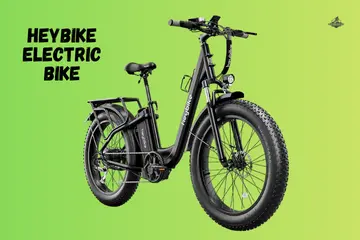
Riding to work in Seattle taught me that e-bikes have their own set of rules. One rainy morning, my favorite commuter felt like a heavy paperweight right when I needed to leave. Dealing with a Heybike bike not starting is a stressful moment that I have helped many friends solve. I have spent years testing these motors and found that the fix is often just a loose plug or a shy sensor. Let me share the expert steps I use to get your power back on in seconds.
The Morning My Heybike Wouldn’t Turn On
It was an early weekday commute, and I had my keys in my pocket and my helmet already strapped tight. I pressed the power button with a confident thumb, but I got nothing but silence and a blank screen. That awkward sidewalk moment where you pretend you are “checking settings” while neighbors walk by is the worst.
My bike was not dead; it just had a tiny connection hiccup that I had to find. I quickly learned that these smart bikes need a very specific startup order to wake up correctly.
What “Not Starting” Means on a Heybike E-Bike
Before you worry about a broken motor, let’s do a quick reality check on your system.
Power Failure vs Motor Not Engaging
Sometimes the display is completely dead, which points to a battery or fuse issue. Other times, the screen is on, but you get no throttle or pedal assist when you move. Knowing which one you have will save you an hour of guessing.
Common Rider Descriptions
- Bike turns on, then shuts off: This usually means a weak battery or a loose main plug.
- Pedal assist works once, then disappears: Often a sign of a misaligned magnet ring.
- Throttle does nothing: Check your brake levers first; they might be “telling” the motor to stay off.
Battery Issues That Stop a Heybike Cold
The battery is the heart of the system, and it causes most startup failures.
Battery Not Fully Seated or Locked
If your battery has an “almost-clicked-in” feeling, it won’t share power with the motor. Vibrations from your last ride can slowly loosen a battery that isn’t locked with the key. Always give it a firm slap and a key turn to ensure it is seated in the tray.
Dead or Deeply Discharged Battery
If your bike sat unused for weeks, the battery might have gone into a “sleep” mode to save itself. Sometimes the charger light looks green (normal), but it is lying because the fuse is blown. Check the small fuse under the rubber cap if you suspect zero power.
Temperature and Storage Effects
Cold garage mornings can make lithium cells sluggish. If it is freezing outside, your display might not light up at all. I always bring my battery inside on cold nights to keep the cells warm and ready for a fast start.
Power Button and Display Problems
If absolutely nothing lights up, your control center is the place to look.
Power Button Not Responding
Moisture or dust can get inside the button housing, especially after a storm. Try holding the button for a full three seconds rather than just tapping it. Sometimes wearing thick gloves prevents the button from clicking all the way down.
Flickering or Blank Display
Check the round, colorful connector behind the handlebars. If that plug is even a millimeter loose, your display will stay dark. It is an early warning sign of a cable that got pulled too tight during a turn.
Brake Sensors Quietly Blocking Startup
This is the most common “hidden” problem. The bike thinks you are braking, so it cuts the motor.
Stuck Brake Cutoff Sensors
Heybikes have sensors in the levers that kill the motor for safety. If your lever doesn’t snap back all the way, the motor stays off. I always do a quick “flick” of both levers to make sure the sensors are open.
Why This Happens After Transport or Storage
If you put your bike in a car or a tight shed, the cables can get pulled. This tension keeps the sensor active. A simple adjustment with an Allen key usually fixes the motor lockout in minutes.
Throttle and Pedal Assist Sensor Conflicts
The system is often just confused, not actually broken.
Throttle Lockout at Startup
Heybike often disables the throttle if it is pressed while you turn the bike on. This is a safety feature to stop the bike from flying out of your hands. If your throttle feels dead, turn the bike off and back on without touching the grip.
Pedal Assist Sensor Misalignment
The magnet ring near your pedals can shift if you hit a bump or get a stick caught in it. If those magnets are too far from the sensor, the bike won’t know you are pedaling. Simply slide the plastic ring back toward the sensor by hand.
Loose Wiring and Controller Connections
Shipping and curb drops cause more loose wires than people admit.
Main Wiring Harness Checks
Trace the thick wire from the display down to the frame. Look for any spots where the wire enters the metal frame; these “entry points” are where cables get pinched. Ensure the main motor plug near the rear wheel is pushed in until the arrows line up.
Controller Overheating or Faults
If you smell something warm or the bike shuts down under a heavy load, the controller might be too hot. Give it ten minutes to cool down. Sudden shutdowns often mean a plug is melting or a wire is shorting against the frame.
Water Damage After Rain or Cleaning
Heybikes handle splashes well, but they don’t like high-pressure water.
Common Water Entry Points
Water usually gets in through the battery terminals or the display connector. If you just washed your bike and it won’t start, use a dry cloth to wipe the metal pins. Never flip your bike upside down to wash it, as water will pool inside the motor.
Early Signs of Moisture Problems
A delayed startup or random power cutouts are signs of “creeping” moisture. If your screen looks foggy, park the bike in a dry, warm room for 24 hours to let the electronics breathe.
Quick Troubleshooting Checklist Before You Panic
Use this 5-minute routine in your garage or a parking lot to save your ride.
5-Minute Restart Routine
- Power off: Turn off the display and remove the key.
- Battery reset: Take the battery out for 30 seconds, then slide it back in firmly.
- Clean reconnect: Unplug the main display cable (green or red) and plug it back in.
Simple Tests That Save a Support Call
- Brake lever check: Pull and release both brakes three times fast.
- Throttle reset: Ensure the throttle moves freely and isn’t stuck.
- Display reconnect: Tighten the round nut on the back of the screen.
When to Contact Heybike Support or a Repair Shop
Sometimes the issue is internal, and guessing can make it worse.
Information Support Will Ask For
Have your model name and battery voltage ready. If your screen shows an “Error 21” or “Error 25,” write that down. This helps the tech team know if your controller or your motor needs a replacement.
Warranty vs Wear-and-Tear Reality
Warranty usually covers a dead motor or a faulty screen. It does not cover a battery that sat empty for six months or a cable you snapped on a curb. Knowing the difference helps you set the right expectations for a fix.
How I Keep My Heybike Starting Every Time Now
I have turned my “no-start” morning into a thing of the past with a few tiny habits.
Smarter Charging and Storage Habits
I never leave my battery at 0% for more than a day. I store my bike in a dry spot and keep the battery indoors during the peak of winter. This keeps the cells healthy and the computer happy.
Weekly Two-Minute E-Bike Check
Every Sunday, I check the battery lock to make sure it is tight. I snap the brake levers to ensure the sensors are clean. A quick tap on the display tells me if the mounts are loose before they cause a real problem.
Final Recommendation
Fixing a Heybike bike not starting is usually about finding a small gap in the power flow. In my expert experience, it is almost always a battery that isn’t locked or a brake lever that is stuck open. Start with the cables and work your way to the battery. You will be back to cruising through the city in no time.
FAQs
A Heybike bike not starting is often due to a low battery or loose power cable. Check the battery charge and make sure all connectors are tight.
Yes, if the battery is empty or not seated right, the Heybike will not turn on. Fully charge it and lock it into place.
Yes, a faulty or loose display can stop the bike from powering up. Reseat the display cable and restart the Heybike.
This can happen if the charger is bad or the battery is worn. Try another charger or test the battery if the problem stays.
Yes, a stuck or damaged power button may not send power. Press and hold it firmly or check for dirt or moisture.
Yes, a blown fuse can cut power to the system. Inspect the fuse near the battery and replace it if needed.
If basic checks fail, contact Heybike support. Motor or controller issues often need expert help.

Co-Founder, Owner, and CEO of RoadHybridBike.
Ehatasamul Alom is a dedicated road hybrid bikes expert. With over 15 years of experience, he helps people find the perfect ride. He began his journey as a bike mechanic. He learned the ins and outs of every bike.
Ehatasamul Alom holds a Master’s degree in Mechanical Engineering from a top university, where he specialized in material science and bicycle kinematics. His master’s thesis focused on optimizing frame geometry for road hybrid bikes to improve rider comfort and efficiency.
Ehatasamul has an extensive professional background. He spent 10 years as a Senior Bike Designer at “Urban Cycles,” a leading bicycle manufacturer. In this role, he led the development of several award-winning road hybrid bikes, which are known for their durability and performance. He later served as the Head of Product Development at “Gear Up,” a company specializing in high-end cycling components. There, he developed innovative parts and accessories specifically for road hybrid bikes.
Over the years, Ehatasamul has become an authority on road hybrid bikes. He understands their design and function. His work focuses on making bikes easy to use. Ehatasamul believes everyone should enjoy cycling. He writes guides that are simple to read. His passion for road hybrid bikes is clear. His goal is to share his knowledge with everyone. He wants to see more people on two wheels. His advice is always practical and easy to follow.
Leave a Reply
You must be logged in to post a comment.